Free Fire Nickname Style 2026 – Best FF Name Generator
Create a cool Free Fire nickname style in seconds with stylish fonts, symbols, decorations, and ready-to-copy FF name ideas for 2026. Whether you need a name for a boy, girl, clan, guild, or pro gaming profile, this FF name generator helps you make your nickname look unique, bold, and easy to copy.
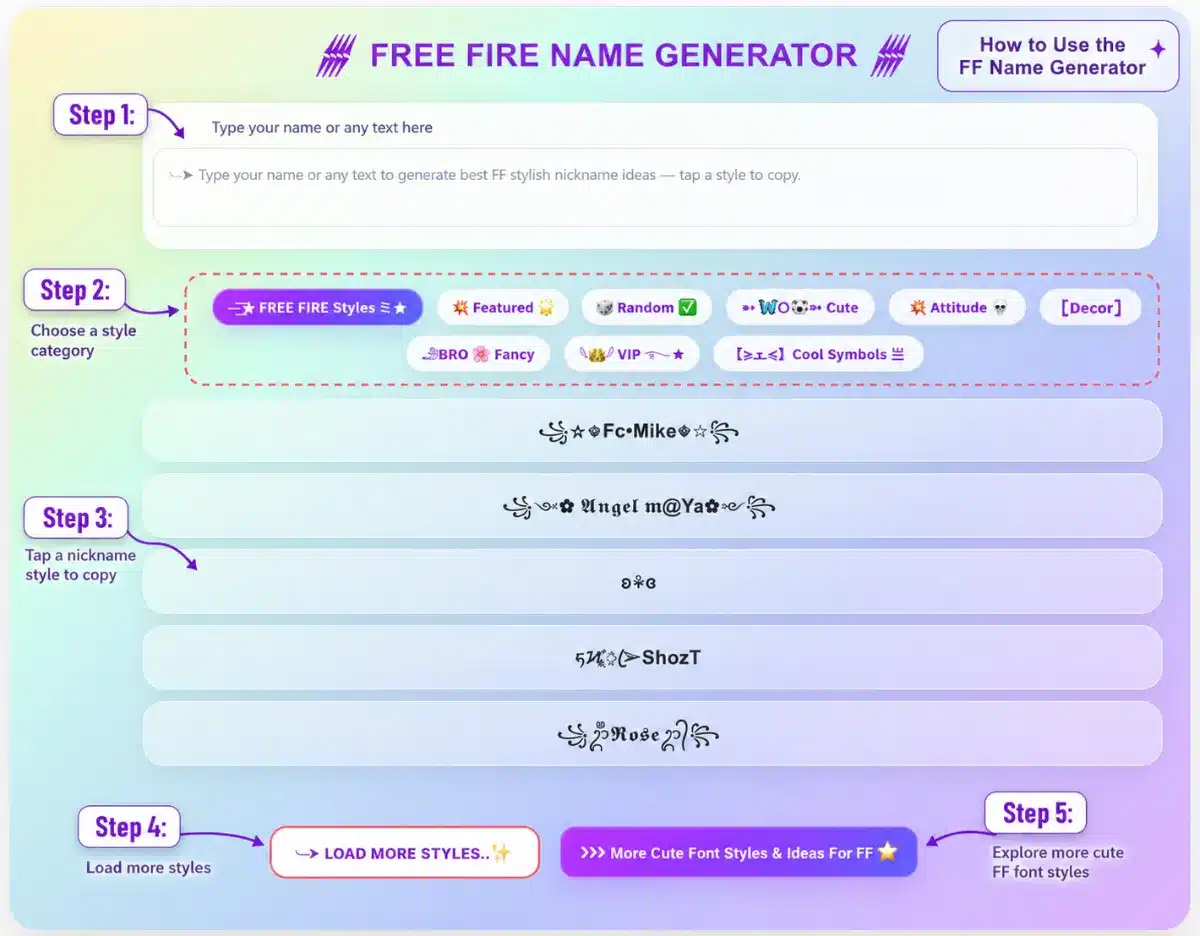
Type your name or any word into the Free Fire Name Generator below to create stylish FF nicknames instantly. Tap any generated name style to copy it, or use the category buttons to explore cute, VIP, attitude, fancy, and decorated Free Fire names.
Using the FF nickname generator is simple: enter your name, nickname, clan tag, or any short text into the box, then choose a style category that matches your vibe. The tool will create multiple Free Fire name styles with symbols, fancy fonts, emojis, and decorations that you can copy with one tap.
To get Free Fire Stylish Name Generator the best result:
Enter a short name, such as Mike, Angel, King, Rose, or your real nickname.
Choose a style like Random, Cute, Attitude, VIP, Fancy, or Cool Symbols.
Tap any name you like to copy it.
Open Free Fire and go to your profile/name change section.
Paste the copied nickname and check if all characters display correctly.
If one style does not work, try another simpler version.
How to use the Free Fire name generator
For a cleaner FF name, keep it short and avoid adding too many symbols. A strong nickname usually has a readable base name, 1–2 cool decorations, and a style that fits your gaming personality.
Free Fire Name Change: How to Change Your FF Nickname ?
A Free Fire name change lets you update your in-game identity with a new stylish nickname, cool symbols, fancy fonts, or a cleaner pro-looking FF name. Before changing your nickname, use the FF Name Generator above to create a name style you like, then copy the version that looks best and is easy to read.
To change your Free Fire nickname:
Open Free Fire or Free Fire MAX on your device.
Go to your Profile from the main lobby.
Tap the edit icon next to your current nickname.
Paste your new stylish FF name into the name field.
Check that the symbols, fonts, and spacing display correctly.
Confirm the change using a Name Change Card or the required in-game option available in your account. Some guides note that changing a nickname usually requires a Name Change Card.
Restart or refresh the game if the new name does not appear immediately.
For the best result, keep your new Free Fire nickname short, clean, and unique. Names with too many symbols may look cool in the generator but can become hard to read inside the game. A strong FF name usually combines a simple base name with 1–2 stylish decorations, such as:
꧁King࿐
★彡Shadow彡★
『VIP』Angel
亗Raven亗
꧁༒Rose༒꧂
If your FF name change fails, the nickname may already be taken, too long, contain unsupported characters, or include symbols that Free Fire does not accept. In that case, try a simpler style, remove extra decorations, or generate another version with fewer special characters.
A good nickname should match your play style: use bold symbols for an attitude name, soft decorations for a cute FF name, or clean fonts for a professional gaming profile. After changing your name, avoid copying famous player names exactly; a unique nickname makes your Free Fire profile stand out more.
A good Free Fire name should be short, readable, and easy to remember. Do not just add too many random symbols; the best FF nicknames usually have a strong base word and a clean style.
Start with a simple name: King, Shadow, Angel, Mike, Rose, Ghost, Raven.
Add only 1–2 decorations to keep the nickname readable.
Use a style that matches your vibe: attitude, cute, VIP, pro, clan, royal, dark, funny.
Mix letters with symbols carefully, for example: 亗Raven亗, ★Angel★, ꧁King꧂.
Avoid copying famous player names exactly; make your name feel personal.
Keep the name easy to read in match, lobby, guild, and profile.
For boys, strong words like King, Hunter, Ghost, Devil, Legend work well.
For girls, soft or stylish words like Angel, Rose, Queen, Luna, Baby are easier to customize.
Test 2–3 versions before using a Name Change Card.
Free Fire Name Rules: What Is Allowed?
Before using any FF nickname style, always test it inside the Free Fire name change box because symbols, fonts, and character limits may display differently by game version, region, or device. Many Free Fire nickname tools use a short 2–12 character range as a safer target, especially when adding stylish Unicode symbols.
Keep your nickname short and not too crowded.
Avoid unsupported emojis or symbols if the game does not accept them.
Do not use hate speech, harassment, threats, discrimination, or offensive words; Garena says inappropriate content in player Signature and In Game Name can be managed under its Abuse Policy.
Do not use names that impersonate official Garena staff, pro players, brands, or other people.
Do not include private information such as phone numbers, email addresses, real addresses, or passwords.
Avoid scam-style names like “Free Diamonds”, “Official Admin”, or “Garena Gift”.
If the name shows an error, remove extra symbols, shorten the base word, or try a simpler FF name style.
Garena’s Terms also state that offensive or inappropriate User IDs may lead to account suspension or termination, so safe names are better for long-term use.