Fontst.com is a fast font style generator that turns your text into fancy, different font styles in seconds. Type once, copy & paste anywhere—social bios, nicknames, captions, comments, chats, and games.
➜ Explore More Font Styles ✔
Browse popular font generators, stylish text ideas for messages, nickname styles, bio fonts, and fun text effects.
💥 Most Common Font Styles
Popular copy and paste font styles people use most for everyday text, quick formatting, and social apps.
Create italic text for stylish messages, captions, and soft-looking profile text.
🔥 PopularMake bold text that stands out in messages, headings, names, and short captions.
💎 PopularGenerate underline-style text for highlighted words, names, and stylish profile lines.
✂️ PopularCreate strikethrough text for jokes, edits, emphasis, and playful chat formatting.
🌿 ClassicTurn normal text into tiny letters for bios, notes, and subtle decorative text.
🫧 CuteUse rounded bubble-style letters for cute names, fun captions, and standout text.
🟪 CleanTry square-style letters for clean, modern text designs and strong visual lines.
⭕ SimpleMake circled text for usernames, decorative labels, and easy-to-notice short lines.
💬 Stylish Font Styles for Messages & Chat
Useful text styles for messaging, chat formatting, comments, notes, and short copy and paste lines.
Create colorful-looking text styles and playful copy for messages, posts, and captions.
⌨️ ChatFontStUse neat fixed-width text for clean message formatting, code-style text, and minimal chat design.
🖋️ ClassicGive your text a vintage typewriter feel for notes, messages, and creative writing styles.
🔠 UsefulGenerate raised and lowered text for formulas, decorative names, and compact mini text effects.
👻 UsefulCreate invisible or blank spaces for names, bios, message tricks, and text layout effects.
🔤 UsefulSwitch letter case quickly for chat text, titles, bios, and clean message formatting.
🔢 UsefulStyle numbers for usernames, dates, scores, tags, and decorative message details.
📦 ChatUse box-style text for headings, labels, short notes, and structured chat messages.
🎮 Stylish Font Styles for Nicknames
Great for game names, usernames, display names, ID styles, and bold-looking nickname designs.
Create classic blackletter-style names for strong, elegant, and dramatic nickname designs.
🖤 NicknameUse gothic-style text for dark, striking names, headings, and bold identity styles.
🪄 StyleMake outline-style letters for sleek usernames, modern designs, and lightweight text effects.
😊 StyleTry rounded, friendly-looking text for cute nicknames, profile names, and soft branding styles.
⭐ DecorAdd star-themed text styles for sparkling names, bios, captions, and decorative lines.
💖 DecorCreate heart-style text for cute usernames, romantic names, and sweet decorative text.
✨ DecorMix symbols with text for stylish nicknames, display names, and eye-catching profile styles.
➜ DecorUse arrow symbols with text for directional bios, clean dividers, and stylish nickname accents.
🌸 Stylish Font Styles for Bio & Profile
Soft, aesthetic, and expressive font styles for bios, profile text, status lines, and short captions.
Create clean aesthetic text for bios, profile names, status updates, and soft visual styling.
🎀 BioUse delicate coquette-style text for pretty bios, cute names, and dreamy profile lines.
💕 LoveCreate romantic text for love quotes, sweet bios, captions, and heartfelt short messages.
💘 LoveMake lovely text styles for bios, names, notes, and cute profile text with a soft feel.
✨ ProfileDecorate short text with visual flourishes for bios, usernames, and personal profile lines.
🥰 CuteAdd kaomoji-style flair to bios, captions, usernames, and expressive social text.
😍 CuteCombine emojis with text for fun bios, captions, profile names, and chat-style decoration.
👨💻 Different Font Name Styles
Browse classic writing-inspired styles for elegant names, artistic text, and refined display lines.
Use flowing calligraphy text for elegant names, invitations, headers, and stylish short lines.
✏️ WritingCreate a handwritten look for personal notes, soft bios, captions, and casual signatures.
💫 WritingGenerate script-style text for elegant wording, feminine bios, and decorative name styles.
🏛️ ClassicTry ancient-inspired text styles for old-world aesthetics, themed names, and dramatic headers.
🕰️ ClassicCreate antique-style text for vintage branding, elegant names, and timeless decorative lines.
👾 Fun & Weird Text Styles
Creative text effects for meme posts, spooky names, glitchy captions, and playful experimental styles.
Make funny meme-style text for jokes, captions, playful posts, and dramatic short reactions.
🙃 FunFlip your text upside down for funny messages, jokes, captions, and surprise text effects.
🌀 WeirdCreate strange-looking text for unique usernames, playful bios, and unusual caption styles.
⚡ GlitchUse glitchy text effects for edgy names, cool posts, gaming bios, and cyber-style captions.
☠️ SpookyCreate spooky text for horror names, Halloween captions, creepy bios, and dark-themed posts.
🕵️ EffectGenerate redacted-style text for mystery posts, hidden-looking names, and bold visual effects.
About Font ST (Font Style)
Font ST stands for Font Style—a simple text styler that helps you create stylish text free without installing anything. Just enter your message, explore various font styles (from clean readable looks to decorative and emoji-fancy styles), then use font style copy paste to post on your favorite platform.
💎 Tip: Some apps or games support only certain Unicode styles. If one font doesn’t display correctly, switch to a more readable style in the Featured/Cool tabs for best compatibility.
Stylish Text Generator: How It Works
This create stylish text generator converts your normal text into fancy font style variants using Unicode characters. Each style is designed for quick use: type → preview → copy → paste.
If you need different font styles for different platforms, Fontst makes it easy to compare options and pick the one that looks best.
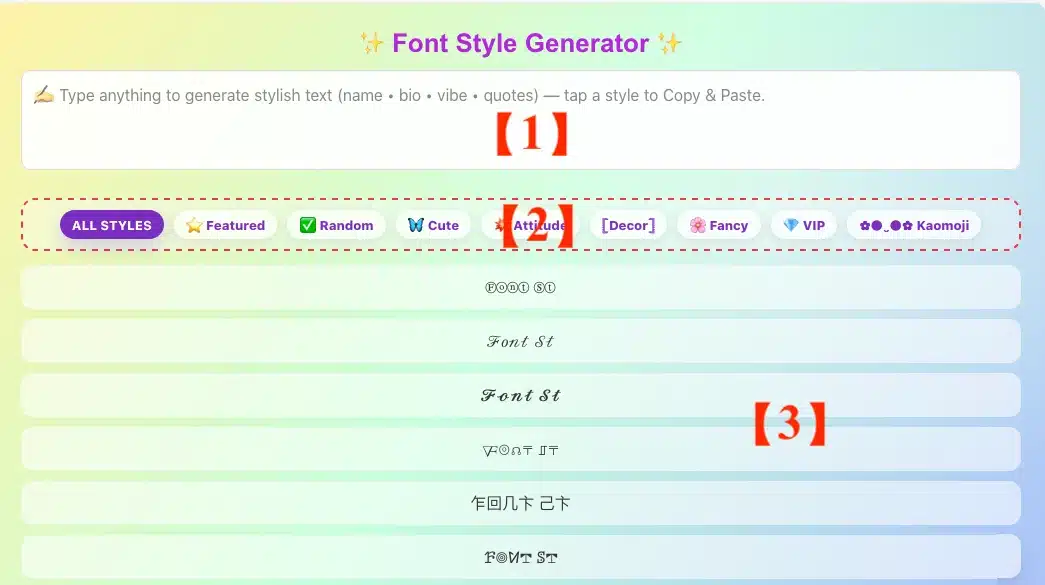
How to use Font St Copy & Paste
- Enter your text in the input box.
- Scroll through various font styles to preview results.
- Tap/click Copy on the style you like.
- Paste it into your app or game profile.
Font style copy paste tips
- Keep it short for usernames and bios for better readability.
- Mix one “headline” style with normal text for clarity.
- If a style looks broken in one app, try a simpler text styler option.
Font Styles Names And Examples
Below is a quick, practical guide to font styles names—with clear examples you can recognize instantly. Use it to (1) learn common style labels, (2) understand major typeface categories, and (3) pick stylish fonts for social you can generate on FontSt.
Font Styles Names List
Here are the most common font style names people search for (especially in design tools, document editors, and UI systems). Each item includes a simple “what it looks like / when it’s used” note.
Core styles (most common)
- Regular / Normal — default text weight for body content.
- Bold — stronger emphasis for headings and key words.
- Italic — softer emphasis, titles, quotes, or subtle contrast.
- Bold Italic — high emphasis when you need it to stand out fast.
- Underline — often used for links or highlighting (use sparingly).
- Strikethrough — indicates edits, completion, or “no longer valid.”
Weight names (how thick the letters are)
- Thin / Hairline — ultra-light, best for large display text.
- Extra Light / Ultra Light
- Light
- Book — slightly heavier than Regular (common in UI fonts).
- Medium
- SemiBold / DemiBold
- Bold
- Extra Bold / Ultra Bold
- Black / Heavy — maximum weight, strong display look.
Width names (how wide the letters are)
- Condensed — narrower letters; fits more text per line.
- Semi Condensed
- Expanded — wider letters; feels open and bold.
- Extended — similar to Expanded, often used in branding.
Letterform variants (common in branding & UI)
- Small Caps — lowercase shown as smaller capitals.
- All Caps / Uppercase And Lowercase — louder, headline-like tone.
- Monospaced — every character has equal width (code style).
- Rounded — softer corners, friendly vibe.
- Outline / Stroke — hollow letters, poster/display usage.
- Shadow — depth effect (mostly decorative).
- Display — meant for headings, not long paragraphs.
Different Font Name
A quick clarification: people often mix these up, so here’s the clean distinction.
1) Font style (variant)
- A variation inside the same font family: Regular, Italic, Bold, Condensed, etc.
- Example: “Inter Regular” vs “Inter Bold” vs “Inter Italic”.
2) Typeface category (font type)
- The broad “class” a font belongs to: Serif, Sans Serif, Monospace, etc.
- This helps you choose the right vibe before you pick a specific font.
Typeface Categories (Common Types) — Explanation + Examples
- Serif — has small “feet” on letters; classic and bookish.
Example use: articles, long reads, editorial designs. - Sans Serif — clean, modern, easy to read on screens.
Example use: apps, websites, UI text. - Monospace — equal-width characters; “code” look.
Example use: code snippets, tech aesthetics. - Script — handwriting/calligraphy feel; elegant or playful.
Example use: invitations, signature-style headers. - Blackletter (Gothic) — old-school, dramatic, medieval tone.
Example use: logos, posters, strong aesthetic titles. - Display — decorative fonts made for headlines (not body text).
Example use: banners, thumbnails, big titles. - Slab Serif — serif with thick block-like terminals; sturdy.
Example use: branding, headings, labels. - Handwritten — casual, personal, imperfect strokes.
Example use: notes, friendly socials. - Rounded Sans — sans serif with rounded corners; soft vibe.
Example use: youth brands, playful UI.
⛳ Tip: If your goal is readability, start with Sans Serif for screen text and Serif for long-form reading. If your goal is aesthetics, start with Display / Script / Blackletter—then keep usage short.
Name In Stylish Font
If you’re here for stylish “font styles” for social, this is the part you’ll use the most. These are style groups that work great for:
- Whatsapp / Instagram / TikTok bios
- gaming names
- Discord nicknames
- status lines and captions
Below are the most popular style groups available on FontSt—each with a best-use tip and a quick link to a dedicated page.
Stylish Font Styles For Social (FontSt)
- Bubble Font — cute, friendly, “soft” vibe for bios and fun names.
- Square Font — clean, blocky style; looks techy and structured.
- Glitch Text — edgy, cyber, distorted look for gamer tags and headers.
- Weird Text — experimental symbols and unusual letter shapes for standout names.
- Italic Font — simple fonts copy and paste but stylish; great for subtle emphasis in captions.
- Bold Font — instant readability and impact for names and short titles.
- Tiny / Small Text — aesthetic mini text for bios, footnotes, and “soft” layouts.
⛳ Practical tip for bios: combine one stylish style + one emoji set + one short phrase. Over-styling can reduce readability, especially on older devices.
Quick Pick: How To Choose The Right Style Name
- Want clean readability? Regular / Medium / Sans Serif
- Want emphasis? Bold / SemiBold / Italic
- Need to fit more text? Condensed
- Want a “code/tech” vibe? Monospace
- Want aesthetic socials? Bubble / Glitch / Square / Tiny / Cursive
Explore Fancy Font Style and Various Font Styles
Not every platform displays Unicode the same way, so Fontst includes a wide range of text style options—from clean minimal looks to bold decorative sets. Whether you want a fancy font style for a bio or a subtle text style for captions, you’ll find multiple choices that stay readable.
Various font styles for everyday use:
- Minimal / clean styles for professional profiles
- Bold styles for headlines and gamer tags
- Cute or aesthetic styles for social bios
- Symbol-friendly styles for short quotes
- Cursive script, cursive writing
- Cool & awesome font generator: graffiti, glitch, curvy, small (tiny), calligraphy, creepy, scary, meme, art text maker, font creator
Font Text Maker For Social Bios, Nicknames & Gaming IDs
Fontst.com is made for the places where a clean name or a standout vibe matters. People use it to style profiles and posts on TikTok (and Douyin), Instagram, Facebook (FB), X (Twitter), Threads, Snapchat, YouTube, Pinterest, LinkedIn, and Quora-plus daily chat apps like WhatsApp, Telegram, WeChat, and QQ.
It also works great for Discord servers (names, roles, and status lines) where a small font tweak can make your identity instantly recognizable.
For gaming, this tool is popular for nicknames, clan tags, and in-game bios across titles like Free Fire (FF), PUBG / BGMI, Roblox (including Adopt Me), Fortnite, Valorant, CODM, Minecraft, League of Legends, Dota 2, Counter-Strike 2, Mobile Legends: Bang Bang (MLBB / ML), Honor of Kings (HOK), Genshin Impact, Pokémon Go, Clash of Clans, Clash Royale, Blockman Go, Among Us, Apex Legends, Rocket League, eFootball, Identity V (IDV), and even GTA V communities.
If you’re editing console profiles too, many users generate stylish text for PSN names and status lines—especially when you want a distinctive look without changing the meaning of your original text.
Quick note: Not every platform supports every fancy style. If a font looks broken in one app/game, switch to a simpler style (Featured/Cool) for better compatibility.
Different Font Styles for Social Media & Gaming
People search for different type of font style because each platform has its own “feel.” A stylish text generator is most useful when it gives you different font styles you can test quickly.
Where Font St works best
- Social media bios (Instagram, TikTok, X, Facebook)
- Messaging apps (WhatsApp, Telegram, Discord)
- Gaming nicknames and clan tags
- Comments, captions, and short status lines
Choose the right different font styles
- For usernames: pick a simple style that stays readable at small sizes.
- For bios: one fancy line + one normal line often looks best.
- For captions: keep punctuation and spacing clean for a polished look.
Create Stylish Text Free (Without Installing Anything)
Fontst is built as a web-based font style generator, so you can create stylish text free on any device. There’s nothing to install—just open the page, type your text, and copy-paste your favorite result.
Create stylish text copy and paste in seconds
If your goal is speed, use the first few “clean” styles. If your goal is aesthetics, explore more decorative sets and pick one that matches your profile theme.
Font Style Changer vs Font Style Generator: What’s the Difference?
These terms are often used interchangeably:
- A font style generator creates multiple styled outputs from one input.
- A font style changer emphasizes swapping your text into a new look quickly.
Fontst is both—a text styler that generates and changes your text style instantly.
A good text style should look stylish and remain readable. Fontst focuses on practical styles you can use daily—so your message stands out without becoming hard to understand. Think of it as a text styler that helps you balance personality and clarity.
Compatibility Notes: Why Some Fonts Don’t Display Everywhere
Unicode-based styles can appear differently across devices, apps, and fonts installed on a system. If one output looks perfect on your phone but odd on a friend’s device, try another style.
Quick compatibility checklist
- Test on the platform you care about most (bio, name, chat).
- Prefer simpler styles for games and older devices.
- If symbols break, remove extra characters and retry.
FAQ – Text Style Changer
Is Fontst a free font style generator?
- Yes. You can create stylish text free and copy-paste results without downloading anything.
Can I use these fancy styles in every app?
- Most modern apps support Unicode text style, but display can vary. If one style doesn’t show correctly, pick a cleaner option from our various font styles list.
What’s the fastest way to get a good style?
- Start with short text, choose a clean fancy font style, then use 100, 21 font style copy paste into your bio or username.
Do you offer different font styles for gaming names?
- Yes. Many options are designed to work well at small sizes, making them suitable for gamer tags and nicknames.
- Happy Birthday Calligraphy Fonts – Fancy Writing & Cursive
- Valentine Font Generator – Sweetheart Candy Fonts
- Bold Facebook Text Generator & How To Bold Text On FB